All FAQsSupport
Reset root password in Nebero ?
Reset root password in Nebero ? In order to reset root password .You need to login on Nebero Server using the credentials given . User: nebero Password: nebero1…
Reset root password in Nebero ?
In order to reset root password .You need to login on Nebero Server using the credentials given .
User: nebero
Password: nebero123 (you will not able to see what you are typing.)
After entering password .Press Enter..You will be promoted to the blue screen given below.
[](https://www.nebero.com/wp-content/uploads/2017/02/p1.png)


	[](https://www.nebero.com/wp-content/uploads/2017/02/p2.png)
Then Press Down Arrow and select Change password.
After selecting Change Password you need to press Tab button and Select Run Tool.
[](https://www.nebero.com/wp-content/uploads/2017/02/p3.png)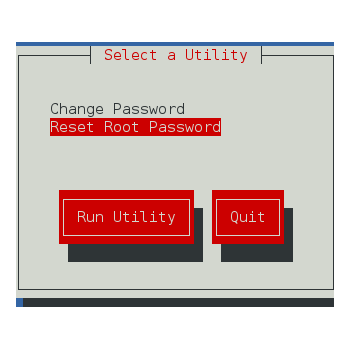
Press Enter .You will be promoted to screen given below.Then press Down arrow and select Reset Root password given below.After selecting reset root password .